If the error: Product is dispensed twice appears, follow this guide:
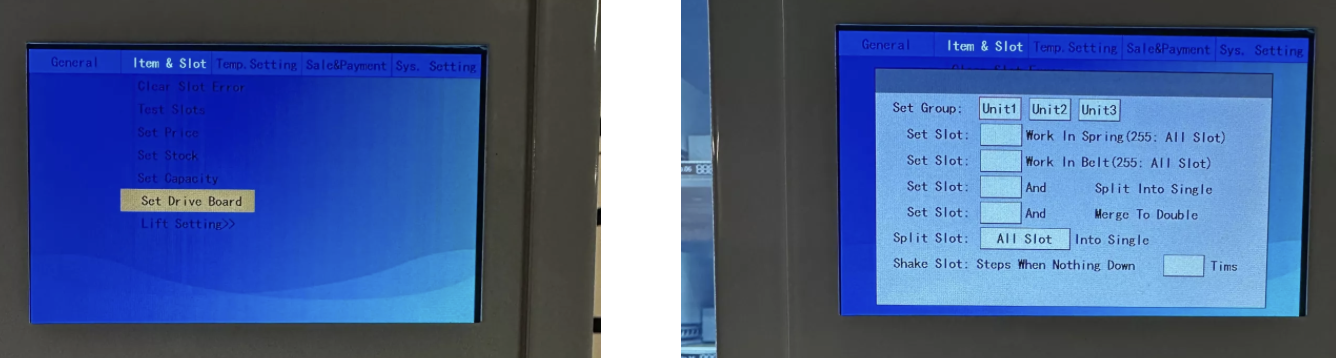
Go to the menu Item & Slot → Set Drive Board.
Set which slots work with Spring (spiral) and which with Belt/Sidepush (conveyor/side pusher).
 Example: If all spirals were replaced, go to Set Slot → Work in Belts (row 3) and type 255.
That way all slots run with conveyor/side pusher.
 The machine now recognizes it's supposed to work with conveyors/side pushers and lift.
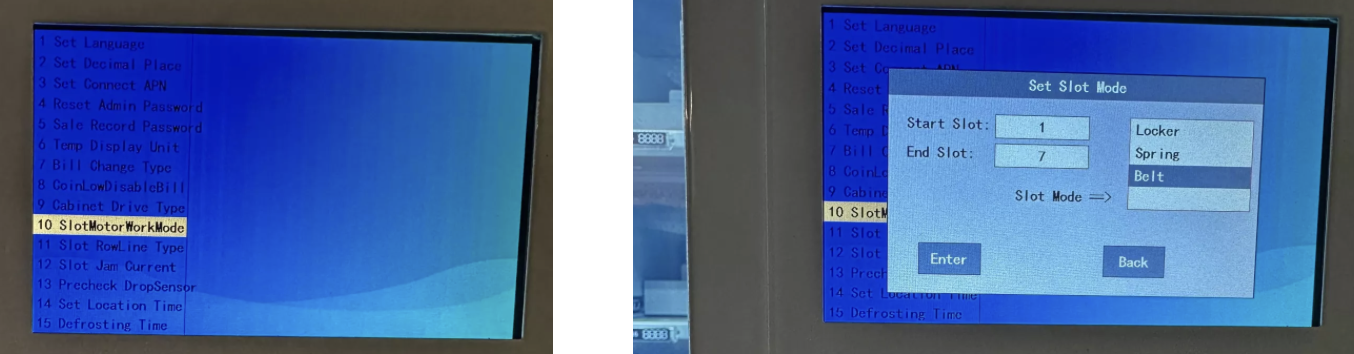
Open the developer menu with the developer password 80515.
Go to item 10 – Slot Motor Work Mode.
Enter Start Slot and End Slot and choose the output mode you want.
Save changes.
Example: If you only want to switch Slot 1–10 to belt:
Start Slot = 1
End Slot = 10
Mode = Belt
The rest will automatically stay on spiral.
SummaryWith lift: Setting in Set Drive Board.
Without lift: Setting in Developer Menu SlotMotorWorkMode.
