The capacity defines the maximum amount, a compartment can hold.
Recommendation: Set the capacity to 199, so you don't have any limit issues later.
Open the machine door → password input appears
Enter password (default: 000000)
Switch to the Set Stock menu
Single compartment:
"Start Slot" = slot number of the compartment
"End Slot" = same slot number
Multiple compartments at once:
"Start Slot" = first slot number
"End Slot" = last slot number
In the field Set Stock enter the current stock
Example: If you’ve filled the compartment with 5 products, enter 5
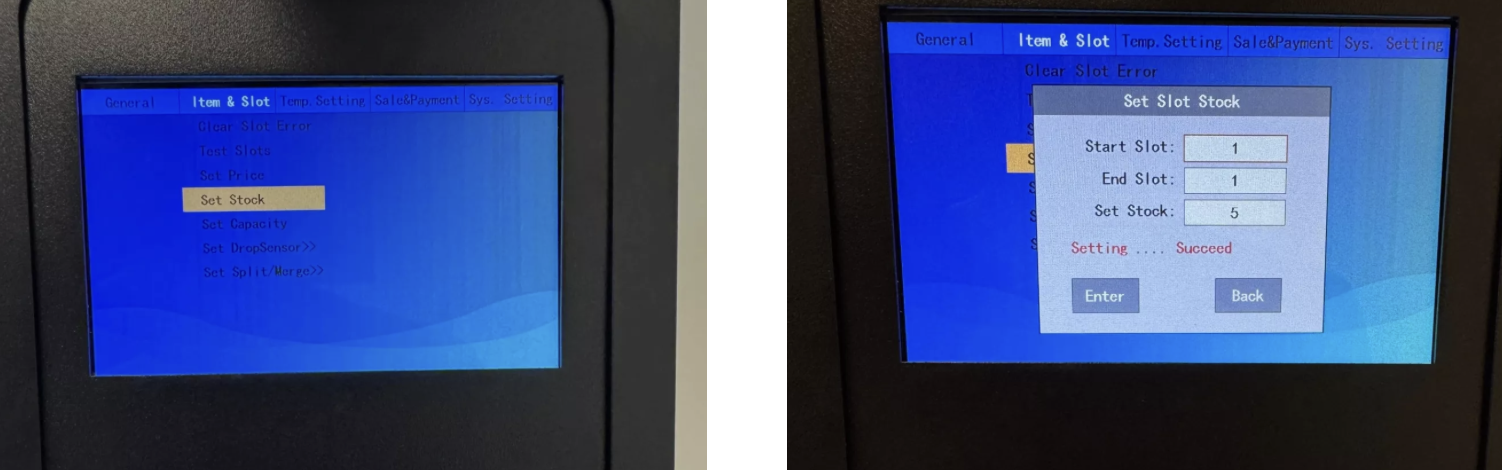
After setting the stock, you can enter the maximum capacity per compartment under Set Capacity (e.g. 199).
Confirm with Enter.
