Your vending machine usually runs an advertising or info video by default, which you can swap out any time. The video file is saved in a fixed folder path on the machine’s system.
 Video location
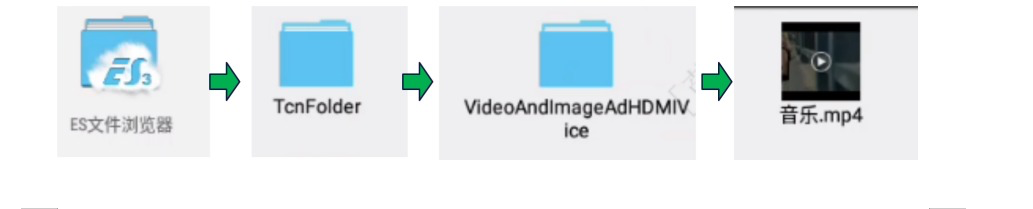
The current path looks like this:
ES Datei Explorer (ES File Manager) open
Go to the folder TcnFolder
Open the subfolder VideoAndImageAdHDMIVice
There you’ll find the video file – e.g. 音乐.mp4
(See screenshot from manufacturer as an example)
 Swap video
Here’s how to swap out the video:
Prepare new video
Format: .mp4
Tip: same resolution and similar file size as the current video
Backup or delete old video
Copy or delete the old file onto a USB stick or to another place, in case you need it again later.
Insert new video
Copy your prepared video from your connected USB stick into the folder VideoAndImageAdHDMIVice.
If you use the same file name, it will automatically overwrite the old video.
Restart machines
After reboot, the machine will automatically play the new video.
 Notes
NotesMake sure the video file isn't too big, otherwise playback might stutter.
It's best to use a USB stick or the internal file manager (like ES File Explorer) to transfer the video.
If the video doesn't show up, check the file extension (.mp4) and the filename.
